Ctrl-Trade Dashboard KPIs Explained

September 15, 2026
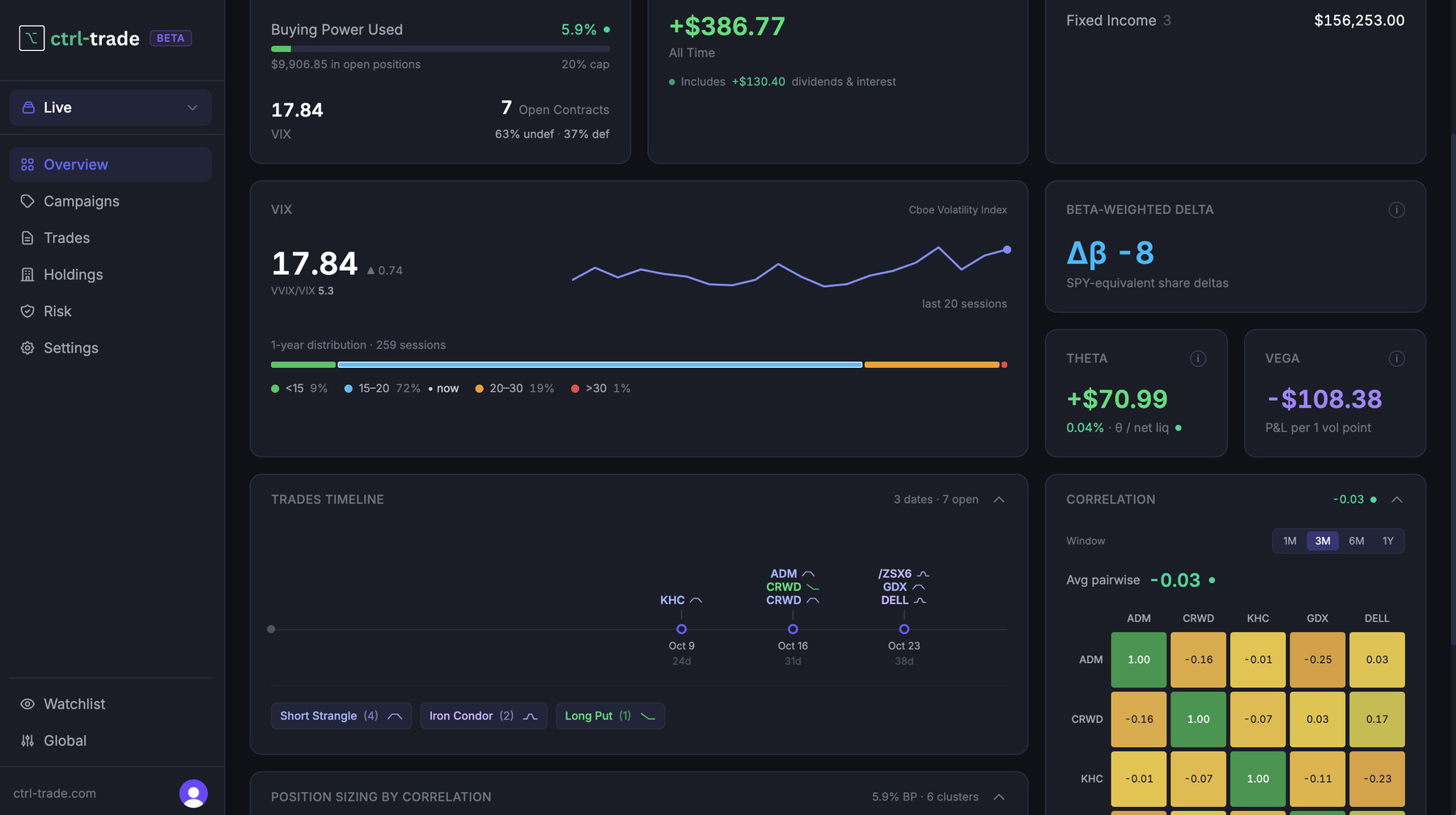
The Ctrl-Trade dashboard is probably the most important part of the whole software — more than the trade log, more than the watchlist. I built it to run my own trading activity with confidence, and every number on it earns its place. I recorded a video walkthrough of the same dashboard too, if you’d rather watch it. This post is a reference — jump straight to the number you’re trying to understand:
- Net Liq and buying power
- VIX: the fear gauge
- Portfolio Greeks
- Correlation and position sizing by cluster
- Diversification by time and strategy
- The risk dots
Net Liq and Buying Power
- Net Liq — the value of your portfolio if you closed everything right now. Not the value of your holdings sitting still — the value if you liquidated. Every other number on the dashboard gets measured against this one.
- Buying power used / available, capped by VIX — how much of your capital is currently deployed, against a cap that moves with the VIX. The logic: higher VIX means richer premiums and lower odds of a loss, so a short-volatility portfolio is supposed to deploy more capital when the VIX is elevated, and less when it’s calm. My own cap right now sits at 20% of buying power; I’m using 6%, with 14% left to deploy. (How that cap gets set is its own topic — the risk framework gets a separate video and post.)
- Open contracts, split by defined / undefined risk — how much of your buying power sits in trades with a hard-capped max loss versus trades that don’t.
- P&L and Holdings — on the dashboard mostly for completeness. Any broker gives you these, so I don’t lean on them much myself.
VIX: The Fear Gauge
The VIX — the volatility index on the S&P 500, often called the market’s “fear gauge” — gets its own section because it’s one of the most important numbers for anyone running an options portfolio.
- VVIX-to-VIX ratio — VVIX is the volatility of the VIX, a derivative of a derivative. When this ratio crosses 6, that’s a red flag for me: don’t trade. I didn’t invent that threshold — it comes mostly from TastyTrade’s research, though I’ve backtested it myself too, and I’ll publish that research separately so you can see it rather than take my word for it.
- VIX spot price and its last 20 sessions — a quick read on where volatility has been trending: coming out of a calm stretch, or already spiking.
- One-year distribution — where today’s VIX level sits against the last year of data (e.g. “9% of the last year was below 15, 72% was between 15 and 20”). It tells you whether the current level is genuinely unusual for the recent past, or just business as usual. It can look like a lot if you’re new to options — it becomes a glance once you’ve traded through a few regimes.
Portfolio Greeks
Most brokers show the Greeks per trade. Very few show them aggregated across your whole portfolio, which is the number that actually matters once you’re holding more than a handful of positions.
- Beta-weighted delta — your entire portfolio’s directional exposure, expressed against one benchmark (I use SPY), even across a genuinely uncorrelated book. Near zero means market-neutral, which is generally where I want to be; positive means you’re effectively long some number of SPY shares, negative means short. Either can be fine — the question is whether it’s where you want to be right now. The market moves every day, so this number drifts even when you haven’t touched your portfolio, which is why it’s worth checking regularly rather than once.
- Theta-to-Net-Liq ratio — the one I watch closest. Theta is the income your book collects from time decay each day; dividing it by Net Liq turns that into a percentage of your whole portfolio, comparable regardless of account size. My own range is 0.05% to 0.2%, with 0.25% as a hard ceiling — inside that band I’m collecting a reasonable amount of premium for a reasonable amount of risk. Cross the ceiling (or whatever threshold you set in the risk framework) and it’s a sign to adjust or close something rather than add more.
- Vega — your portfolio’s sensitivity to a change in volatility, independent of price direction.
Correlation and Position Sizing by Cluster
- Correlation (3 / 6 / 12 months, selectable) — how correlated your open trades have actually been over a trailing window. You can drill into any specific pair, but the number that matters most is the average pairwise correlation across the whole book. Close to zero means genuinely diversified positions — and that matters because the less correlated your underlyings are, the less your P&L swings as a block, and the less a single bad move can hurt more than one position at once.
- Position sizing by correlation cluster — the rule that took me longest to get comfortable with. The standard advice — cap how much you risk on any single trade — is obvious, and every trader should have one. But with options, you can hold several correlated assets and still be fine, as long as the combined size of that cluster stays inside a single position-sizing cap. Say your max per trade is 7%: it’s better to split that 7% across two or three correlated names than to concentrate it in one — you keep the discipline while adding real diversification. The failure mode is exceeding your cap across a correlated cluster without noticing, because no single trade looks oversized on its own.
Diversification by Time and Strategy
- Time distribution — when your open positions actually expire, spread across a calendar view.
- Strategy breakdown — how much of your book is short strangles versus iron condors versus long puts, or whatever mix you run.
Neither is as critical as the numbers above, but I like keeping both spread out rather than stacked on a single date or a single structure. It’s a smaller lever, but a free one.
The Risk Dots
Every widget on the dashboard carries a small status dot, and that’s what ties the whole thing together. Green means healthy. As you approach a threshold — on buying power, on theta-to-net-liq, on anything else you’ve configured in the risk framework — it shifts to orange, then red. That’s the entire point of putting all these numbers in one place: I don’t want to remember thirty limits and check them by hand. I want the dashboard to tell me the moment something needs attention, and to show me how a new trade would fit before I place it.
Here’s the bold promise underneath all of it: if the risk framework is set up properly — that’s a separate topic, covered in its own video — and you stay inside the limits the dashboard shows you, the portfolio should be able to survive basically any market crisis. That’s not a claim I’m making on faith. It’s exactly what Replay Mode exists to prove: run your own risk parameters against real historical crashes and see whether they’d have held. Replay Mode gets its own video too — this dashboard is simply the cockpit that makes both of them usable day to day.
Trade Well,
Francesco
Software Developer & Options Trader
Creator of Ctrl-Trade. A software developer of 15+ years who brings a programmer’s discipline — clear rules, data and backtesting — to options trading, and writes about what he learns in plain English.